
What Is a CRM Platform and How Does It Help a Business Grow?
Key Facts
What is a CRM platform?
A CRM platform is software that centralises customer data, tracks interactions, and gives sales, marketing, and service teams one shared view of each customer's history and next steps.
What does CRM stand for?
CRM stands for customer relationship management — both the business approach to managing customer relationships and the software that supports that work across teams.
When does a business need a CRM platform?
When customer data is scattered across spreadsheets, inboxes, and separate apps, and more than one team needs shared visibility into leads, sales activity, and customer interactions.
Quick Summary
What is the #1 CRM platform?
This article does not rank CRM platforms or name a single best option. The right CRM depends on your process, visibility needs, and how well it fits your existing tools.
What are examples of CRM platforms?
Examples range from systems focused on contact and pipeline tracking to broader platforms that also support marketing, service, reporting, automation, and customer data unification.
What is an example of a CRM platform?
A practical example is a shared system that stores contact records, tracks leads and opportunities, logs customer interactions, and gives teams one view of each customer.
What a CRM platform is
A CRM platform is the software system a business uses to manage customer relationship management. CRM stands for customer relationship management, and the term can describe both a business approach and the technology that supports it. In practice, a CRM platform gives teams one place to document, track, and manage relationships with current customers and potential customers. It stores core records such as contact details, account information, and a history of interactions so teams are not relying on scattered notes or disconnected tools.
Modern CRM platforms do more than hold a contact list. They bring together customer data from different touchpoints and help teams see sales activity, marketing engagement, service interactions, and other relationship history in one system. The practical value is visibility and coordination. When sales, marketing, and service teams can work from the same record, it becomes easier to understand where a customer stands, what has already happened, and what follow-up should come next. A CRM platform helps organisations organise revenue activity, support more consistent communication, and make better use of customer data instead of letting it sit in separate systems.
What a CRM platform actually does in day-to-day operations
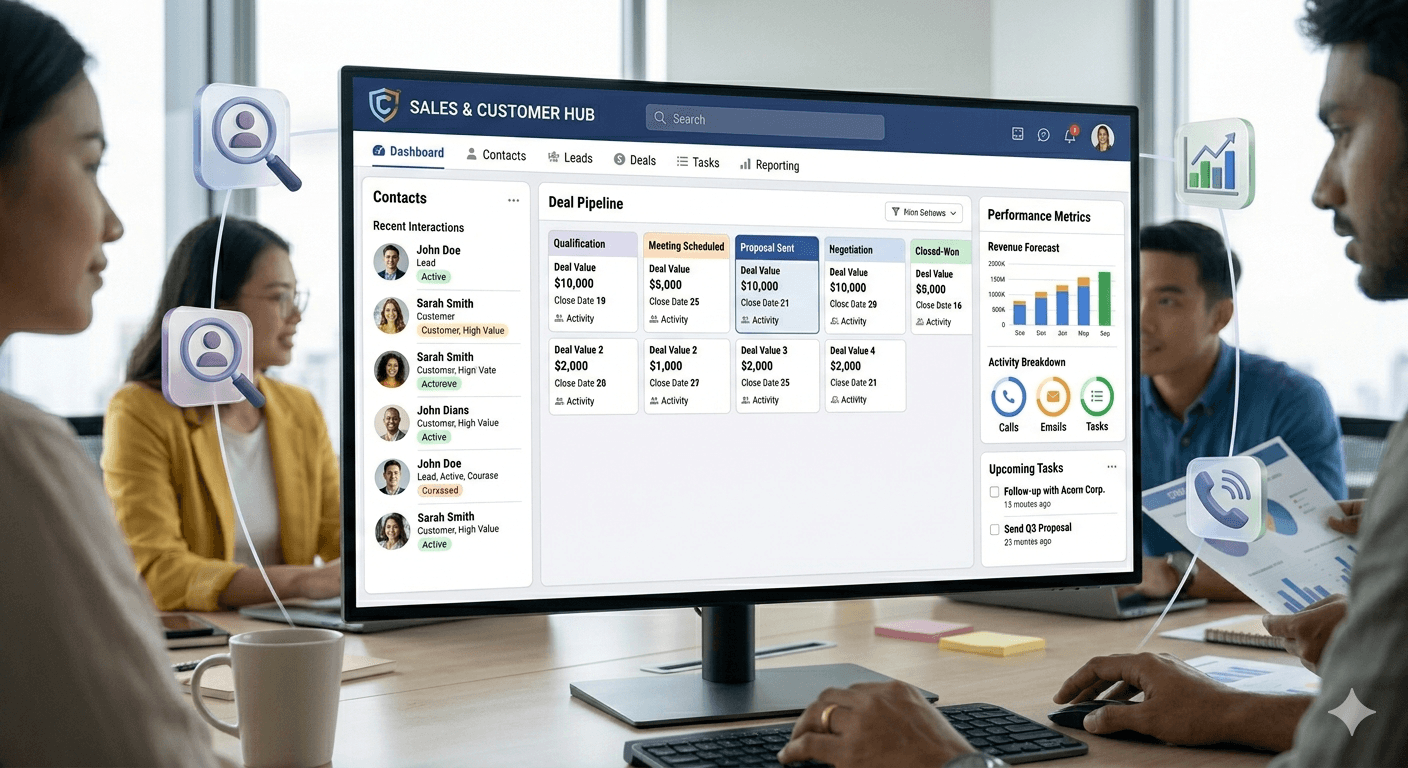
In day-to-day work, a CRM platform acts as a shared system for customer information and ongoing interactions. It gathers details from different communication channels — including a company website, phone, email, live chat, marketing touchpoints, and social media — then keeps that information attached to the same customer record over time. This gives a business one place to document relationships with both current and potential customers instead of spreading that history across separate inboxes, notes, and spreadsheets.
Teams then use that record to move work forward. Sales teams can track leads and opportunities, record conversations, manage follow-ups, and see where each deal sits in the pipeline. Marketing teams can use the same data to understand engagement and support campaigns, while service teams can review past interactions when helping a customer.
A CRM platform also helps managers and frontline teams see what is happening across accounts and pipelines. Dashboards and reports can show lead generation activity, sales pipeline status, and the overall health of customer relationships in one place. That makes it easier to spot stalled opportunities, measure activity, and keep a clearer view of how customer interactions are progressing across the business.

Core features you can expect in a CRM platform
Most CRM platforms start with the same foundation: a shared place to store and manage customer information. That usually includes contact details, company or account records, and a history of interactions such as emails, calls, purchases, or support activity. The goal is to give teams one current view of the customer instead of scattered records across separate tools or spreadsheets.
From there, a CRM often expands into workflow, reporting, and coordination across the customer lifecycle. Many systems include customisable dashboards, process automation, and reporting so teams can track leads, sales activity, and customer health in one place.
- Contact and account management form the base layer of most CRM systems.
- Many platforms also include marketing support, service support, dashboards, automation, and AI-assisted insights.
Sales features at the core
For sales teams, one of the most common CRM capabilities is pipeline and opportunity tracking. A platform can help teams document leads, move deals through stages, and see where opportunities are sitting in the sales process. Teams often need to adapt fields, views, and dashboards to match their own sales process, reporting needs, or customer types. That flexibility matters because CRM is not just a contact list — it is a working system for tracking relationships and revenue activity over time.
Marketing, service, and unified customer data
Many CRM platforms also support marketing and customer service, not just sales. Marketing features can help teams organise audiences, manage outreach, and connect campaign activity back to customer records. Service features give support teams a clearer picture of past interactions so they can respond with more context at each touchpoint. Some CRM platforms include or connect to a customer data platform to combine online, offline, and third-party data into a more complete customer view. When this works well, teams get a broader picture of each customer and can use that data for reporting, automation, and more informed follow-up.
Why businesses use CRM platforms
Businesses use CRM platforms because they need one place to document, track, and manage relationships with both current and potential customers. In practical terms, that gives teams a clearer view of who a customer is, what has happened so far, and what should happen next.
A major reason companies adopt CRM is to improve lead management and follow-up. CRM software helps companies measure and control lead generation and sales pipelines through a single dashboard. That matters when leads come in from different channels or move between marketing, sales, and service teams.
CRM platforms are also used to create more consistent customer relationships and better internal coordination. When the same record is available to multiple teams, handoffs become clearer, conversations are better informed, and the customer experience is less fragmented.
Decision-makers also value CRM because it improves visibility and reporting. Linking and analysing customer data helps businesses see activity levels, spot opportunities, and understand where their process needs work. CRM is not only for large enterprises — small and mid-sized businesses can benefit as well, especially when they need a clearer process for handling demand, tracking relationships, and growing in a more organised way.
How to tell if a business needs a CRM platform
A business usually starts needing a CRM platform when customer and lead information is no longer easy to track in one place. If contact details, sales conversations, marketing responses, and service notes live across spreadsheets, inboxes, and separate apps, teams lose a clear view of each customer. These coordination problems are a practical sign that basic tools may no longer be enough.
Another sign is when more than one team needs to stay aligned around the same customer data. As sales, marketing, and service activity grows, many businesses outgrow ad hoc systems because they need linked data, shared visibility, and reporting that shows what is happening across the customer lifecycle. At that point, it helps to ask a simple question: do you only need a place to store contacts, or do you need a broader platform that supports lead management, customer interactions, and analysis across several functions?
- Warning signs include scattered data, missed follow-ups, duplicate records, and unclear ownership.
- Businesses often outgrow spreadsheets and disconnected tools when sales, marketing, and service data all need to stay aligned.
- A useful decision point is whether the business needs only a contact database or a wider system for managing customer relationships across teams.
The simplest way to think about a CRM platform
The simplest way to think about a CRM platform is this: it is the system a business uses to keep customer data, track interactions, and manage relationship-driven work in one place. The main job of a CRM is not just storing contacts. It helps teams document conversations, follow leads and opportunities, and keep a shared view of existing and potential customers across sales, marketing, and service.
That is where the real value comes from. When customer information is connected instead of scattered, teams get better visibility into what is happening, what should happen next, and how to improve the full customer lifecycle. If you are comparing options, focus less on brand hype and more on practical fit. Look for a CRM that matches your process, gives your team clear visibility, and connects well with the tools and data sources you already rely on.
- A CRM platform centralises customer information and interactions.
- A strong choice should fit your workflow and integration needs.

References
Frequently asked questions
What does CRM stand for?
CRM stands for customer relationship management. The term can describe both the business approach to managing customer relationships and the software platform used to support that work.
How is a CRM platform different from a contact list?
A contact list mainly stores names and details. A CRM platform goes further by tracking interactions, leads, opportunities, service history, follow-ups, dashboards, and shared workflows across teams.
Who uses a CRM platform inside a business?
Sales, marketing, and customer service teams commonly use CRM platforms. Managers also use them to review pipeline activity, reporting, and the overall status of customer relationships.
When does a business usually need a CRM platform?
A business often needs a CRM when customer and lead data becomes scattered across spreadsheets, inboxes, and separate apps. It is especially useful when multiple teams need shared visibility and clearer process tracking.
What are the main benefits of a CRM platform?
The main benefits are better visibility, stronger coordination, more consistent follow-up, and clearer reporting. By keeping customer information connected, a CRM helps teams manage relationships more effectively over time.
Next step
See what a unified customer view looks like
If you are comparing CRM options, start by understanding how shared customer records improve visibility across sales, marketing, and service.
Talk to the sysConnector team →About the author

Michelle Low
Founder, sysConnector
Michelle Low is the founder of Omnify X and creator of sysConnector. She enjoys turning messy marketing and CRM setups into simple, connected systems that actually work in real time. Michelle writes about marketing automation, system integrations, customer data, and practical ways to fix broken lead flows—based on what she's building and testing day to day.
More from the blog

How Marketing Agencies Can Capture, Route, and Manage Leads
Learn how marketing agencies can capture, route, and manage leads with clearer intake, faster handoffs, lead scoring, and tighter follow-up processes that reduce lead loss.
Read more →
How to Set Up Your Business for Successful SMS Campaigns
SMS success depends on more than a short message. Learn how clean data, segmentation, automation, and system integration set up campaigns that convert.
Read more →
What Is a Marketing Automation Platform and Why Data Quality Matters
Learn what a marketing automation platform does, why data quality is the make-or-break factor, and what it takes to make automation reliable across your tools.
Read more →